
CheckBook and CheckBook Pro 2.5 needed a little extra time to pass the Mac App Store approval process but hey, hey! The wait is over. Both are now available on the Mac App Store - and guess what that means? Get the update and iCloud will keep your Accounts in sync on multiple Macs!
Check out this cool comic Allan doodled to show you how awesome syncing is: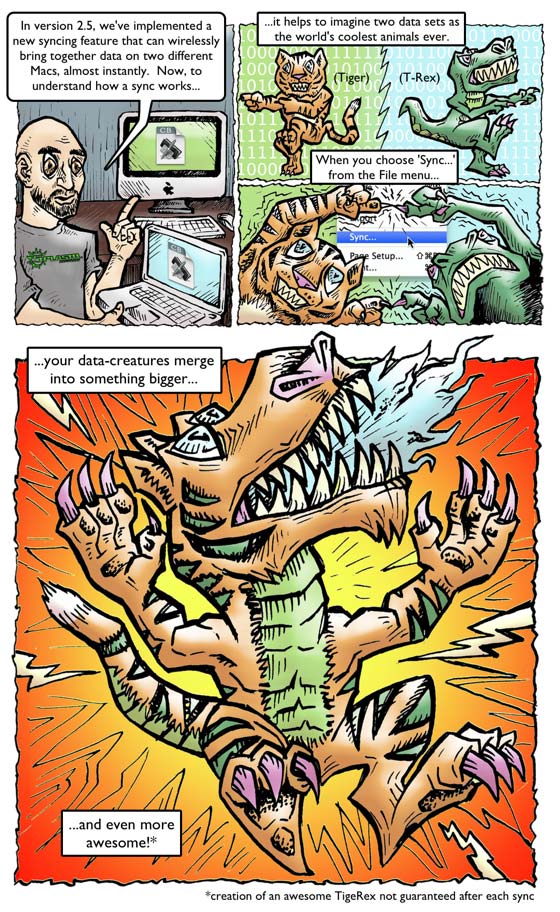
Besides local network and iCloud syncing, CheckBook 2.5 comes with oodles of other goodies:
- Accounts are now stored in documents so you can create multiple documents, store them anywhere and copy them between Macs.
- Changes are now saved immediately.
- Full support for Retina Display.
- Sandboxed on OS X Lion and OS X Mountain Lion. Ready for GateKeeper on OS X Mountain Lion.
- Entry Notes column.
- Password reset procedure.
- Text import and export enhancements.
- Encrypted passwords.
- Minor user interface adjustments.
A little footnote here about CheckBook for iOS: Now that CheckBook can sync Mac to Mac, it's a whole lot closer to syncing Mac to iPhone or iPhone to iPad or etc. to etc. We're all systems go on CheckBook for iOS!
CheckBook Pro Mac App Store Amnesty Days
 When the Mac App Store opened it came without one killer feature: an easy way for current users of an app to switch their license to the Mac App Store. App developers like us can give away just 50 free copies for each new version of an app - but that's nowhere near the number of people out there using CheckBook every day!
So what can you do if you originally purchased CheckBook or CheckBook Pro directly from our online store and now you want to move your license to the Mac App Store? You wait for a sale that makes it pretty darn cheap! We hereby proclaim the next three Wednesdays (August 14th, 21st and 28th) will be Mac App Store Amnesty Days. We'll lower the price of CheckBook Pro to just US $4.99 on these days so you'll have a chance to move your license over for just 20% of the regular price. And, if you originally purchased CheckBook you'll get a swell upgrade to CheckBook Pro, to boot!
Already got CheckBook 2.5 or later and just want to upgrade to CheckBook Pro? No problem, but you'll need to tell CheckBook Pro where your Accounts document is. If you're not sure, just make a backup a copy in CheckBook and open the backup in CheckBook Pro: Open CheckBook, go to the File menu, click the Backup… menu item, save a backup in your Documents folder or on your Desktop, open CheckBook Pro, go to the File menu, click the Open… menu item, then navigate to the backup document you just made and open it. Check out Moving on up to CheckBook Pro for additional details. If you need a hand, let us know at support@splasm.com and we'll help out.
The Chronicle reviewed Audiobook Builder!
Check it out! The Chronicle's Brian Croxall calls Audiobook Builder "Three Quick Tabs to Getting Stories on Your iPod". Amen!
Pretty sweet seeing screenshots of our precious and the words "higher education" on the same page!
Meet William - and wish Terra well
 William Gill, our new "Ethereal Transistor", signed on with Team Splasm this spring, bringing a few decades of experience in code wizardry, ministry, toastmastery and even flight instruction. So keep an eye out for that app that hasn't been invented yet - the one that let's you write a sermon, remotely emcee a social event and fly a plane - all at once. William has spent time in California, Ohio, Washington, Arizona, Missouri, Florida, and Venezuela, has some musical chops and is already hard at work on a real app we hope to release this autumn.
Our Resident Pixie Terra signed off last Friday, following her heart to pursue a master's degree in Marriage and Family Therapy. Please join us in wishing Terra all the best!
 The way we catalog our audiobooks is highly personal - and some of us pay extra special attention to the author and narrator. Whether you like the author or narrator to be stored in the artist, album artist or composer tag, it's up to you in Audiobook Builder. Just head to the Audiobook Builder menu, click the Preferences… menu item and choose where "Author" and "Narrated by" will appear in your future audiobooks.
 If you've updated CheckBook or CheckBook Pro since May, head to the CheckBook menu and click the About… menu item to make sure you're running the latest version (2.5.3). We found and fixed a rare but serious issue in 2.5 and 2.5.1 that can cause CheckBook to crash and lose data. Don't wait - get the latest version of CheckBook or CheckBook Pro.
Backups in CheckBook and CheckBook Pro 2.5 are easier than ever. When you go to the File menu and click the Backup… menu item you'll get a bona fide copy of your Accounts document. Put it in a safe place, like another hard drive or a thumb drive, and if you need to "restore" it, just copy it to where you keep your documents and double-click it from there.
Get social, Splasmfolk!
We're on the Twitter, we like the Facebook, we oogle with Google+, and our discussion forum is full of users helping each other get the most out of our apps. Check us out on one or all for tips, tricks and news!


Stay up-to-date
Get the latest features and fixes - probably for free!
 Audiobook Builder 1.5.3 Free for Audiobook Builder 1.x users
 Checkbook 2.5.3 Free for CheckBook 2.x users
Checkbook Pro 2.5.3 Free for CheckBook Pro 2.x users
ViddyUp! 1.8.4 Free!
Brightness Control 1.0.4 Free!
Dasher 1.0.3 Free!
Griddle 1.0 Available on the Mac App Store
Thanks for your support!
Your encouragement and feedback really help keep us going. Drop us a line if you need anything!
Keith, Randy, Allan & William


 feedback@splasm.com